
Feels like a spreadsheet
Type data, edit cells, move with Enter and the arrow keys, select cells and ranges.
Free · Open source · In your browser
Long formulas are hard to write in a single line and harder to read later. EN8BLOR turns them into blocks you can see, move and reorganise, writes the formula for you, laid out to read, and turns any formula back into blocks.
Illustration of how EN8BLOR works. The real app, shown further down, looks like this.
Build
Every Excel function is a block with its arguments in place. Snap blocks into each other and the formula is written as you go, in the result panel inside the editor.
372 functions
Read
EN8BLOR lays out the formula it writes: one argument per line, LET names next to their values, every closing bracket where you expect it. The result still works in Excel and Google Sheets.
=LET(SALES, SUMIFS($G$2:$G$500, $B$2:$B$500, A2, $C$2:$C$500, ">="&$J$1), TARGET, XLOOKUP(A2, $L$2:$L$40, $M$2:$M$40, 0), IF(TARGET = 0, "No target", IF(SALES >= TARGET, "On target", ROUND(SALES / TARGET * 100, 0) & "%")))=LET( SALES, SUMIFS($G$2:$G$500, $B$2:$B$500, A2, $C$2:$C$500, ">="&$J$1 ), TARGET, XLOOKUP(A2, $L$2:$L$40, $M$2:$M$40, 0 ), IF(TARGET = 0, "No target", IF(SALES >= TARGET, "On target", ROUND(SALES / TARGET * 100, 0 ) & "%" ) ) )
Choose Spanish and the blocks show the function names of a Spanish Excel, with the semicolon as separator. Choose English for the English names and the comma.
The formula EN8BLOR writes uses the English function names, with the separator you chose.
=ROUND(SALES / TARGET, 2)=ROUND(SALES / TARGET; 2)Separator: ,;Decode
Copy a formula from a workbook, an email or a forum, paste it in the decoder and EN8BLOR builds its blocks. The quickest way to understand a formula someone else wrote, or one you wrote a year ago.
=IFERROR(INDEX($C$2:$C$90, MATCH(A2, $B$2:$B$90, 0)), "Missing")LAMBDA
Testing a LAMBDA in Excel means knowing that you have to call it with its values at the end. EN8BLOR finds its arguments, asks you for them and builds the call for you.
=LAMBDA(a, b, a * b)Type a value or select a reference
Insert and calculate=LAMBDA(a, b, a * b)(A1, B1)Grid
Insert the formula you just built into the grid and see what it returns. Show the grid or hide it, make it wider or narrower, or swap it to the other side of the editor.
Type data, edit cells, move with Enter and the arrow keys, select cells and ranges.
Add and delete sheets in a clear, visual way.
Create names for your ranges and use them in your formulas.
Pick a reference for a block from a small floating grid, even with the main grid hidden.
Open an .xlsx file with all its sheets and formulas, and decode them into blocks.
Save the grid with its formulas, with the separator your regional settings use.
The grid calculates the most used functions (SUM, IF, XLOOKUP, FILTER, LET, LAMBDA and others) to test your formulas. Excel is still the reference for the final result.
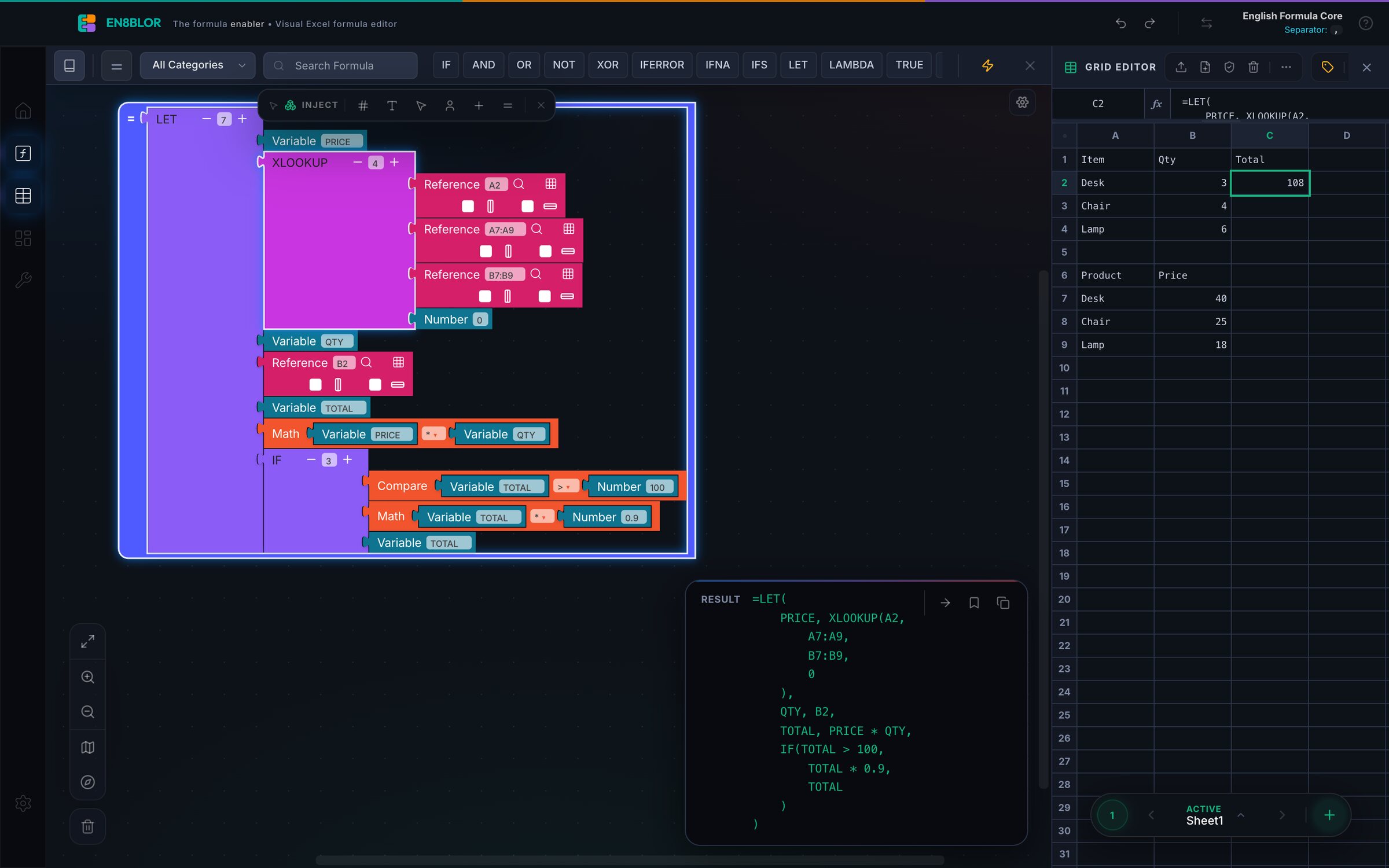
The real app
The editor fills the window. The tools take the least room they need, the formula is written inside the canvas, and the grid sits beside it when you want it.
And more
Keep the formulas you use most in your own library.
Save all the formulas on your canvas in one file and open it later.
See every block on the canvas and jump to any of them.
Fold the parts of a formula you are not working on.
Zoom in and out, and centre the formula you are working on.
Swap the editor and the grid left or right, and show only the toolboxes you need.
Your canvas is saved in the browser while you work.
Data types and operators in two dropdowns, one step away.
Open source
EN8BLOR started as a tool for our own work with large Excel models: building long formulas without switching back and forth to Excel all the time. It helped, so we shared it. It keeps evolving with the needs of the people who use it.
No account, no subscription, no limits. Open it and start.
Read how it works, run it yourself and propose improvements.
The editor runs in your browser. Your canvas, your snippets and the workbooks you open stay on your computer.
The block editor is Blockly, the open-source visual programming library.
Some Google Sheets–only functions, such as ARRAYFORMULA, have not been tested yet.
EN8BLOR opens in your browser on a computer. Nothing to install.